Architecture
Giving a chat-native agent a voice

The questions people actually ask
Bruce is EGI’s enterprise execution agent. It works across every department of a company, on top of the systems they already run: ERP, CRM, inbox, calendar and the rest of their tools. Look at what people ask it day to day and most of it isn’t creative work. It’s questions about their own business:
- “What’s our gross profit month to date?”
- “Did the Acme order ship yet?”
- “Any new quote requests since this morning?”
- “Log a note on the account that I stopped by today.”
These are short questions with exact answers, usually asked between meetings or from the driver’s seat. People were already typing them one-handed. Voice is the natural way to ask them, so when reps started asking to talk to Bruce, the request made sense. The hard part was everything that happens around the answer.
What chat gives you for free
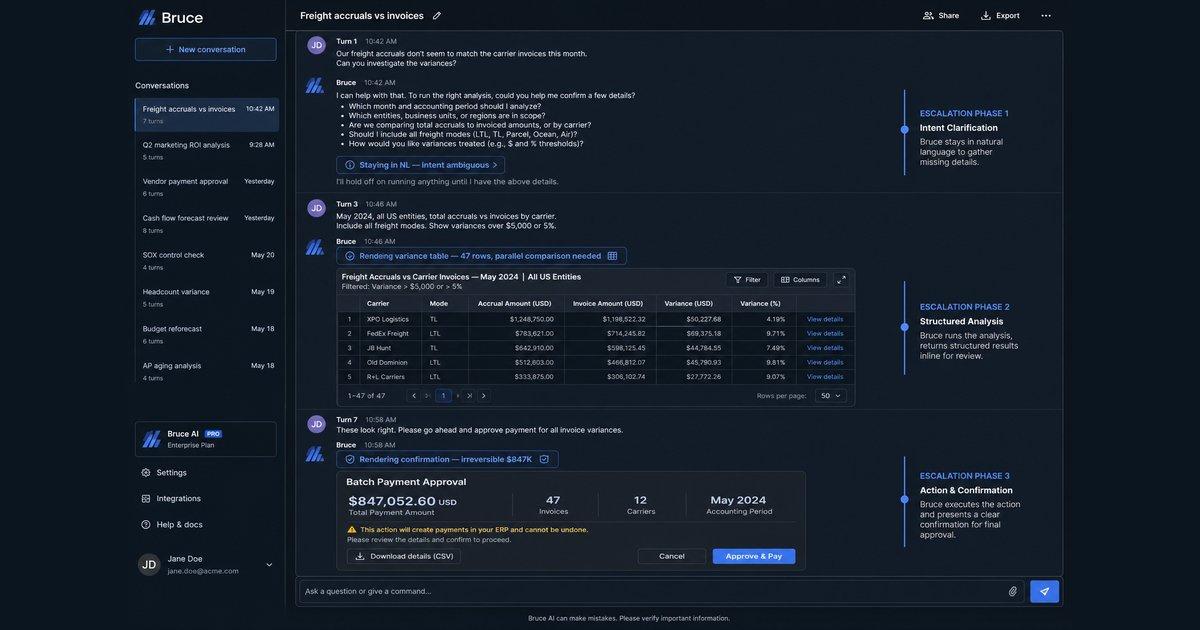
In the web app, a turn is more than a reply. While Bruce works, you watch it narrate each step and see which tool it is using. You can open any step and see exactly what ran. When it wants to change something in a system of record, it stops and shows an approval card, and nothing is written until you approve.
Under that screen sits the harness: the parts that make Bruce safe to point at a customer’s data.
- Live narrationBruce says what it is doing at each step
- Tool callsan ERP query, a CRM search, code in a sandbox
- The work behind the answeropen any step to see exactly what ran
- Approval cardsnothing changes in a system of record until you approve
- Tools per companyeach company only gets the tools it turned on
- Permissionsdeny, ask or allow, set per company, role, person and agent
- Write detectionspots any change to a CRM or ERP before it runs
- Approvals that holdthey survive a restart and run exactly what was shown
- Tenant isolationevery read and write stays inside one company
All of it was designed around a screen. Voice has no buttons, and on a phone call there is no screen at all.
Two agents, or one agent with a voice
We tried both designs before choosing.
The first was a second agent built for voice, with its own tools, prompts and approval flow. It worked, but it meant running two agents. Every new feature had to be built twice and tested twice, and every change to permissions had to be copied into a second place where it could quietly drift. The voice agent would always be the weaker, less tested one.
The second was a voice layer on top of the agent we already had. The voice handles the conversation, and anything that needs real work goes down to the same Bruce that answers in chat. One agent, one set of permissions, one place to add features.
Voice is a layer on top of the harness, not a second agent.
Picking the voice model took longer than picking the design. We ran evals across the realtime voice models on the market, including OpenAI’s GPT-Live and ElevenLabs, until we found one that could hold a natural conversation, tell when a request needed Bruce, and hand it off cleanly. A model that sounds great but answers business questions from its own imagination is worse than no voice at all.
A mouth and a brain
The voice model runs the spoken conversation. Bruce does the work. A small turn controller in the browser sits between them.
- The browser talks to the voice model directly, so audio never touches our servers.
- When the voice model decides a request needs Bruce, the browser sends the user’s own words to Bruce, through the same path the chat box uses.
- Bruce runs a normal turn: the same agent, tools, approvals and tenant boundaries as a typed one.
- The turn controller watches Bruce work and decides what the voice should say out loud and what it only needs to know.
The link between the two is text in both directions. That one choice is what lets everything else stay the same.
Permissions live below the voice
We put the voice model and the turn controller above the harness on purpose. A spoken request reaches Bruce as the same kind of request as a typed one, from the same signed-in person. So it passes through the same permissions, the same policy checks and the same approvals, with nothing special for voice.
Speaking a request never unlocks anything that typing it wouldn’t.
That ordering keeps role-based access intact. A role that can’t change the CRM can’t change it by voice either. A change that needs approval in chat needs it in voice. And when the harness improves, voice gets the improvement for free. We recently moved every tool call onto one shared set of checks, and voice needed no changes for it.
It also keeps costs down. Voice and chat share one conversation and one cached prompt, so moving from typing to talking doesn’t start Bruce over from scratch.
Turning a screen into speech
The plumbing was the easy part. The real work was deciding, item by item, what each thing on the screen becomes in speech.
Knows the CRM search and the invoice pull are done, without reading them out.
Approvals by voice
By approvals by voice we mean this: you call Bruce and ask it to draft an email to a customer. Bruce reads the draft back to you, but it still waits for your clear go-ahead before sending, because a wrong email is a customer-facing problem. The same goes for a change in the CRM, an update in the ERP, or anything else that lands in a system of record.
This was one of our main pillars, and it got the most design time, because it is where voice could quietly weaken the system. The first request for it came from a rep who was driving and couldn’t tap the screen.
- One path. A spoken yes goes through exactly the same approval as the Approve button. There is no voice-only shortcut to audit.
- A strict ear. A question (“yes?”) or a yes with a change (“yes, but make it 300”) approves nothing. Bruce asks again.
- Two meanings of cancel. “Cancel that” can mean “stop what you’re doing” or “cancel the order”. The first stops Bruce. The second is a business request, so it goes through the normal approval like any other change.
Seeing what the voice did
Each voice session is one trace, joined to every request it handed to Bruce. When an answer sounds wrong, we can see what the voice heard, what it passed down, what Bruce did and what came back. Voice failures don’t throw errors. They sound like a slightly wrong answer, and that trace is how we find them.
We also replay real sessions whenever we change the turn controller. That is how we caught a “go on” from the voice that split one request in two, and a voice that kept saying “still on it” while nothing was running. Those stories get their own post.
What we’d tell another team
- Don’t give your voice model a second copy of your tools. Have it hand off to the agent you already trust.
- Evaluate voice models on your real requests, not on how natural they sound in a demo.
- Put permissions below the voice layer. The input device should never change what is allowed.
- Go through what the screen did, item by item: progress, results, approvals, cancel, drafts.
- Speak the headline and let the screen hold the table.
Voice turned out to be a new way to ask, not a new agent. That is why it was safe to ship, and we’re really proud of how it came out. To try it, go to app.bruce.sh and click the voice icon.
Next up: we hooked the same system up to a phone line, so you can call Bruce from a real phone number. That one gets its own post.
Thanks for reading.