If you work in sales or solutions, you have lived this: a discovery call went well, the buyer wants a POC proposal by Friday, and you are staring at a blank PowerPoint template. You copy the last deck, find-and-replace the customer name, hunt down the deal value in Salesforce, paste in architecture diagrams, and spend two hours fixing text boxes that overflowed when you changed the font size.
Bruce flips the workflow. You describe what you need — a solution architecture deck, a POC proposal, an executive summary — and Bruce pulls the account name, deal stage, dollar value, and contact names from CRM. It selects the right template, builds the slides, runs layout QA, and delivers a downloadable PPTX you can preview right inside Bruce.
Data-driven means the deck is built from live context — not a stale template with manual find-and-replace. Account, deal, contacts, and product narrative flow in automatically.
How It Works
1. Ask in plain language
Tell Bruce what deck you need. No slide-by-slide spec required — "create a PowerPoint deck" or "build a POC proposal for Aureliant Software" is enough to start.
2. Bruce picks the template
Bruce selects the right deck type — solution architecture, POC proposal, executive overview — and captures your company template style.
3. CRM data flows in
Account name, deal value, stage, contacts, and product context populate the slides automatically. No copying from Salesforce into PowerPoint.
4. Layout QA runs automatically
Bruce checks for cover formatting issues, card overflows, and overloaded summary panels — and fixes them before delivery.
5. Preview and download
Review the deck in Bruce with slide navigation and full-screen preview. Download the PPTX when ready.
6. Iterate in minutes
Ask for an executive version, a more technical version, or a customer-branded variant for a different account.
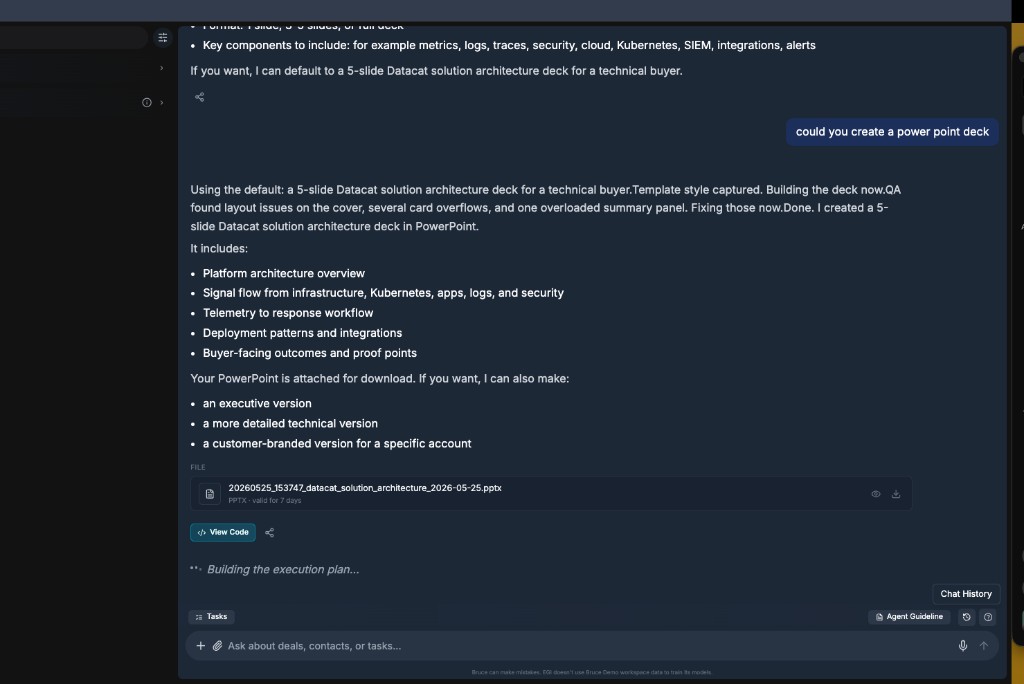
Ask Bruce for a deck — it builds, QA-checks, and delivers a downloadable PPTX
Two Deck Types Teams Use Most
Solution architecture deck
For technical buyers and evaluation committees. Bruce builds a structured overview — platform architecture, signal flow, telemetry workflow, deployment patterns, and buyer-facing outcomes.
- Platform architecture overview
- Signal flow across infrastructure, apps, logs, and security
- Telemetry-to-response workflow
- Deployment patterns and integrations
- Buyer-facing outcomes and proof points
Account-branded POC proposal
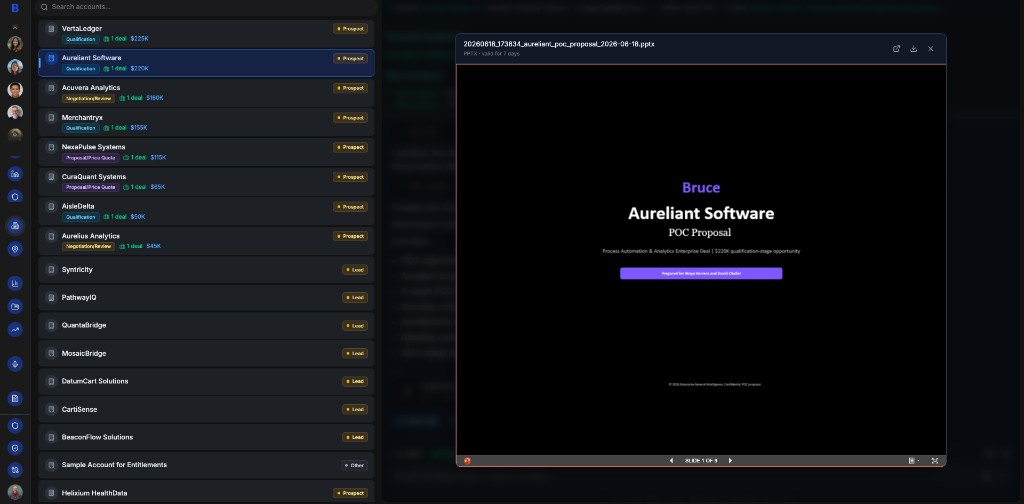
For a specific opportunity. Bruce pulls the account from CRM — name, deal value, stage, and contacts — and generates a customer-branded cover slide and proposal narrative.
- Customer name and deal context on the cover
- Deal stage and dollar value from CRM
- Prepared-for line with buyer contacts
- POC scope, timeline, and success criteria
- Confidential footer with your company branding
Account-branded POC proposal — CRM data on the cover, preview inside Bruce
From Call Strategy Brief to Executive Deck
The most powerful decks are not copied from last quarter's template. They are built from the same deal intelligence Bruce assembles before the call — call objectives, MEDDPICC hypotheses, validated Meet notes, and qualification scorecards. When discovery confirms pain and gaps metrics, Bruce does not make the AE rebuild the narrative in PowerPoint. It generates the executive deck from live context.
Think of it as the presentation layer on top of the call strategy brief: hypotheses prepared before the Meet, validated on the call, scored in Sheets — then rendered as a data-driven PowerPoint the champion can forward internally. Same rigor as MEDDPICC. None of the find-and-replace.
Call strategy brief → Meet validation → qualification scorecard → executive deck. The deck reflects what the deal actually proved — not placeholder bullets with the customer name swapped in.
Harbor Goods executive business case — built from call strategy brief, Meet notes, and Sheets qualification
Executive Summary
Harbor Goods · Shipping & Logistics · $185K opportunity
Validated from discovery
- ▪Pain · Confirmed: Public 2-day delivery promise under margin pressure
- ▪Metrics · Gap: ~6 hrs/week manual carrier benchmarking across 4 regions
- ▪Compelling event: Peak season preparation — August deadline
Business case framing
Protect the 2-day delivery promise without eroding margin
Operator-grade outcome for Jordan Greene and Dana Whitfield — not a workflow automation pitch.
What Makes It Data-Driven
A generic AI slide generator gives you pretty templates with placeholder text. Bruce connects to your CRM and deal context — so the deck reflects the actual opportunity, not lorem ipsum.
- Call strategy brief hypotheses — pain, metrics, economic buyer, compelling event
- Validated Meet notes and post-call qualification scorecard
- Account name and deal value ($185K) on cover and summary slides
- Buyer contact names in the prepared-for line
- Quantified pain and ROI framing from discovery — not generic value props
- Company template style — fonts, colors, and layout preserved
- Proof points matched to the buyer persona and deal stage
What Your Afternoon Actually Looks Like
Without Bruce
Discovery call ends at 2 PM. Buyer wants a POC proposal by Friday. You open PowerPoint, duplicate last quarter's deck, search Salesforce for the deal value and contact names, and spend the rest of the afternoon fixing layout issues on the cover slide. You send a draft at 7 PM that still has the wrong company name on slide 3.
With Bruce
Discovery call ends at 2 PM. You tell Bruce: "Build a POC proposal for Aureliant Software." Bruce pulls the $220K qualification-stage deal, populates Maya Herrera and David Chafer on the cover, runs layout QA, and delivers an 8-slide PPTX by 2:15 PM. You preview it in Bruce, download, and send a polished draft before your next call.
Built-In Layout QA
Bruce does not just generate slides — it reviews them. Before delivery, Bruce runs an automated QA pass on layout and formatting:
- Cover slide formatting and title alignment
- Card and panel overflow — text that breaks out of containers
- Overloaded summary panels with too much content
- Consistent spacing and font sizing across slides
- Fixes applied automatically before the PPTX is delivered
QA found layout issues on the cover, several card overflows, and one overloaded summary panel. Fixing those now. Done.
Old Way vs. Bruce Way
Old way: “Duplicate last quarter's deck and find-and-replace the customer name.”
Bruce way: “Build a POC proposal for Aureliant Software.” — CRM data, contacts, and deal value populated automatically.
Old way: “Spend an hour fixing text boxes that overflowed when you changed the template.”
Bruce way: “Layout QA found card overflows and fixed them before delivery.”
Old way: “Open PowerPoint to check if slide 3 looks right before sending.”
Bruce way: “Preview all 8 slides in Bruce — navigate, full-screen, download when ready.”
Old way: “Build a separate executive deck and a separate technical deck from scratch.”
Bruce way: “Want an executive version, a more detailed technical version, or a customer-branded version for a different account?”
Old way: “Copy last quarter's business case slides and swap the customer name.”
Bruce way: “Build an executive business case from the call strategy brief — pain confirmed, metrics gap, compelling event populated automatically.”
Presentations Cheat Sheet
“I need a deck for this account” → “Bruce, build a POC proposal for [account name].”
“Technical buyer wants architecture” → “Bruce, create a solution architecture deck for a technical buyer.”
“Need it shorter for the exec” → “Bruce, give me an executive version — 5 slides max.”
“Want to review before sending” → “Bruce, show me the deck preview.”
“Different account, same format” → “Bruce, regenerate this as a customer-branded version for [account name].”
Best Prompts
Quick generation
- Bruce, create a PowerPoint deck.
- Bruce, build a solution architecture deck for a technical buyer.
- Bruce, create a POC proposal for [account name].
- Bruce, build an executive summary deck — 5 slides.
Account-specific
- Bruce, build an executive business case deck for Harbor Goods from the call strategy brief.
- Bruce, create a POC proposal for [account name] using the qualification scorecard.
- Bruce, build a customer-branded POC proposal for Aureliant Software.
- Bruce, create a deck for the [account name] deal — include deal value and stage on the cover.
- Bruce, regenerate the architecture deck with [account name] branding.
- Bruce, add proof points from our last win in [industry] to this deck.
Review and iterate
- Bruce, show me the deck preview.
- Bruce, give me a more detailed technical version.
- Bruce, shorten this to an executive version.
- Bruce, fix the layout on slide 3 — the cards are overflowing.
Example Scenarios
Executive business case deck
After discovery validates the call strategy brief, Morgan asks Bruce for an executive business case for Harbor Goods. Bruce pulls confirmed pain, quantified metrics gaps, compelling event, and stakeholder names from Meet notes and Sheets — and delivers a 6-slide PPTX Jordan forwards to Dana Whitfield in Gmail. Same deal thread, no manual rebuild.
Post-discovery POC proposal
After a strong discovery call with Aureliant Software, you ask Bruce for a POC proposal. Bruce pulls the $220K qualification-stage deal, adds Maya Herrera and David Chafer to the cover, and delivers an 8-slide branded deck in minutes. You preview in Bruce, download, and send before end of day.
Technical evaluation deck
A technical buyer asks for architecture documentation before a pilot. You tell Bruce to create a solution architecture deck. Bruce builds 5 slides — platform overview, signal flow, telemetry workflow, deployment patterns, and outcomes — runs layout QA, and delivers a PPTX you can share with the evaluation committee.
Executive vs. technical versions
You built a technical architecture deck for the evaluation team. Now the VP wants a 5-slide executive version for the board. Ask Bruce — it regenerates from the same context with fewer slides, higher-level outcomes, and no infrastructure detail. Same data, different audience.
Final Rule
Presentations should be built from live deal context — not copied from last quarter's template. Bruce pulls the account, the numbers, and the contacts into the deck, runs layout QA, and puts a polished PPTX in your hands in minutes. Your job is to review, refine, and send — not to fight PowerPoint formatting.
Stop rebuilding decks. Start asking Bruce.