If you work inside sales, you already know: quote requests are the job. Not part of the job — the job. You open your inbox at 7 AM and there are 15 RFQs that came in overnight. Half have PDF takeoffs attached. Three say “same as last time.” One is a photo from a foreman on a job site. Every one needs part numbers looked up, stock checked, pricing applied, and a response sent before the contractor hears back from your competitor.
Speed wins. When an estimator blasts the same bid to four distributors, the first accurate quote back gets the release. Not the cheapest quote eventually — the first good one on their desk.
Bruce does not replace you. Bruce handles the re-keying, cross-referencing, and stock lookups so you can focus on the quotes that need your judgment — margin calls, substitutions, vendor buyouts, and the project packages that actually win margin.
Bruce is connected to your email. Quote requests arrive — Bruce picks them up automatically. Parse, price, send straightforward quotes autonomously. Put complex drafts in Gmail for your reps to review and send.
Already Connected to Your Email
Bruce is not a tool you paste quote requests into. Once connected to your Gmail or Google Workspace inbox, Bruce automatically monitors incoming email and picks up quote requests as they arrive — no forwarding, no copy-paste, no manual handoff.
- Connected to inside sales rep inboxes, shared quote inboxes, and team email aliases
- Automatically detects inbound quote requests from email subject, body, and attachments
- Starts parsing, customer matching, and ERP lookup the moment a request arrives
- Works on new emails and replies within existing customer threads
- Handles multiple concurrent requests across the team without queueing
- Inside sales does not need to tell Bruce about a new request — Bruce already sees it
“A customer emails quotes@yourcompany.com at 7:42 AM. By 7:44 AM, Bruce has parsed the BOM, matched the customer, and either sent the quote or placed a draft in Gmail.”
“Your reps do not forward emails to Bruce. Bruce is already in the inbox.”
Why Speed Wins for Inside Sales
- Estimators blast the same RFQ to four distributors — first accurate quote on their desk wins the release
- Bid deadlines are hard cutoffs — late quotes do not get reconsidered
- Will-call and same-day customers expect a quote while they are still on the phone
- Every hour re-keying a PDF takeoff is an hour you are not quoting the $200K gear package
- Customers remember who responded fast — speed builds trust on future bids
- Autonomous quoting on repeat MRO and stock items clears your queue for the quotes that need you
What Your Morning Actually Looks Like
Without Bruce
15 overnight RFQs sitting in the inbox. You start at the top, open the first PDF, and begin re-keying line by line into the ERP. By 9 AM you have quoted 3 of 15. Two customers already emailed asking if you received their request.
With Bruce
Bruce picked up all 15 overnight. Six straightforward repeat orders were quoted and sent before you logged in. Four complex drafts are waiting in your Gmail Drafts with flagged items. Three need follow-up for missing specs. You open Gmail and start with the quotes that actually need your eyes.
Two Modes: Autonomous vs. Your Review in Gmail
Autonomous Mode
For the quotes you should not have to touch. Repeat orders, standard MRO, known catalog numbers, will-call stock items. Bruce quotes and sends while you are working the complex stuff — or before you even log in.
- Repeat purchases — customer says "same as last time" or "same as PO #4821"
- Standard MRO: breakers, wire, fittings, boxes, lamps
- Single-manufacturer packages under your team's threshold
- Established customers on contract pricing
- In-stock at the serving branch with confirmed lead times
Your Review in Gmail
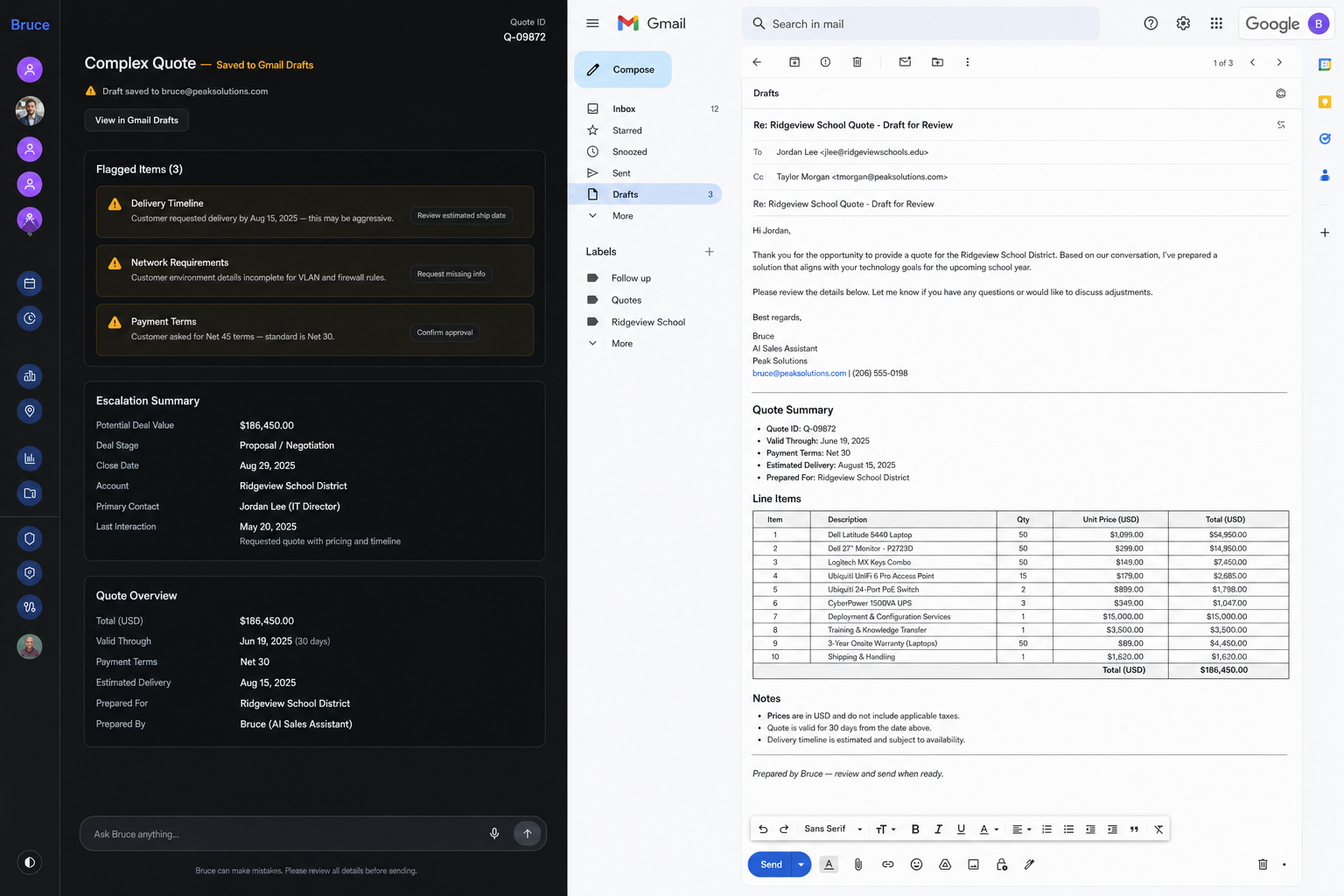
For the quotes that need your judgment. Bruce does the heavy lifting — parsing, matching, pricing — then puts the full draft in your Gmail Drafts folder. You review, tweak what needs tweaking, and send.
- Multi-manufacturer project packages (lighting, gear, devices, controls)
- Missing specs, wrong part numbers, or ambiguous descriptions
- Long-lead gear, switchgear, or special-order items
- Margin below floor or contract pricing exceptions
- New accounts, credit holds, or COD-only customers
- VE requests, cross-reference substitutions, vendor buyouts
- Full quote draft waiting in Gmail — not buried in a queue
Illustration: Autonomous mode — straightforward quotes sent in minutes without tying up inside sales
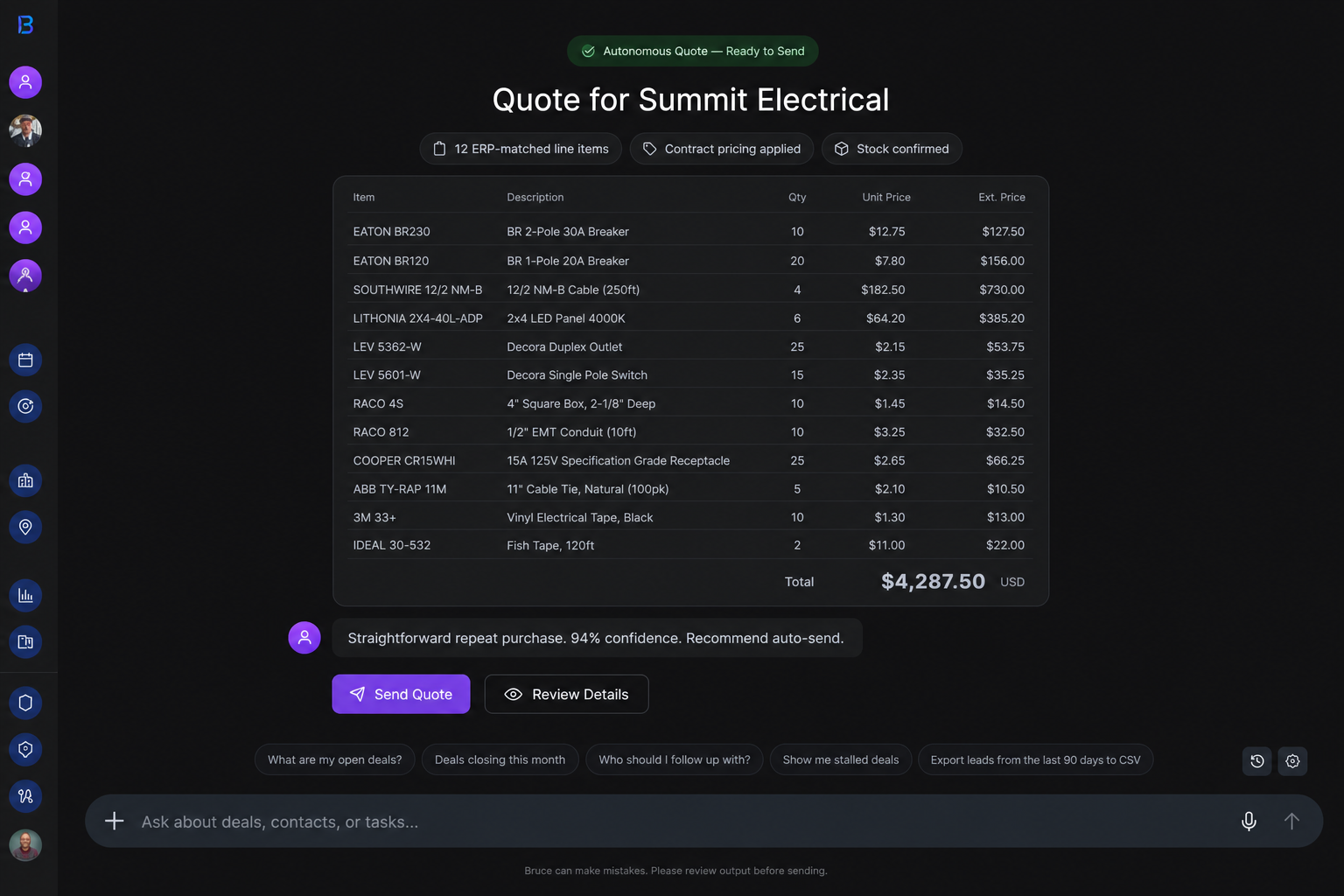
Illustration: Complex quote draft in Gmail Drafts — inside sales reviews, tweaks, and sends
The Bruce Quote Standard
Every inbound quote request should produce five things:
- A parsed bill of material: What did the customer actually ask for?
- A matched customer record: Who is this, and what is their pricing context?
- An ERP-backed line list: Part numbers, stock, lead times, and alternates
- A pricing decision: Contract tier, rebate, margin, and competitive context applied
- A next action: Sent autonomously, draft waiting in Gmail for your review, or follow-up sent for missing info
1) Automatic Intake from Connected Email
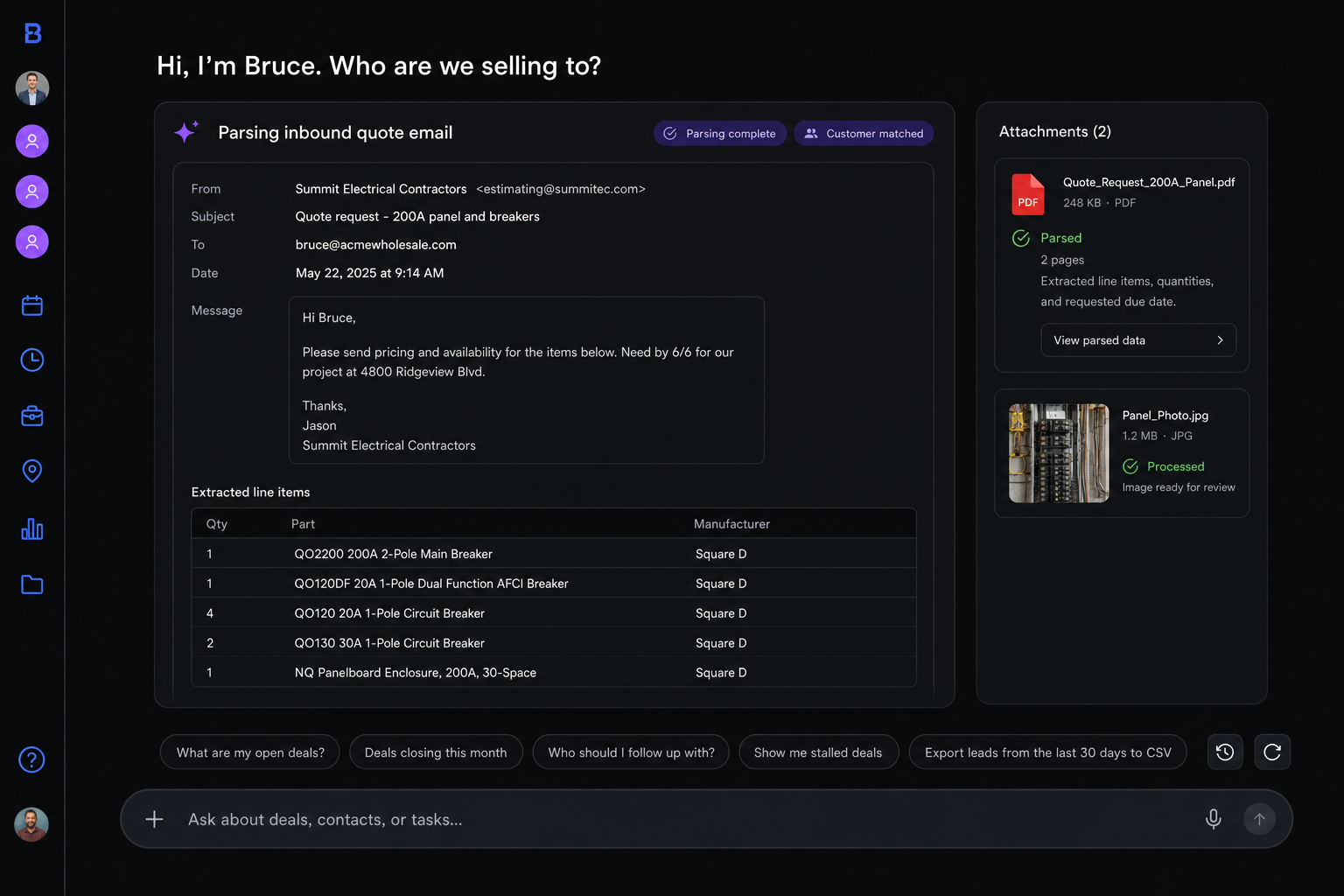
Because Bruce is already connected to your email, inbound quote requests are picked up automatically. Bruce detects the request, reads the email body, opens attachments, and extracts structured line items — without anyone on inside sales doing anything first.
What Bruce Automatically Picks Up
- Emails with inline part lists, catalog numbers, or "need price on the attached"
- PDF takeoffs, spec sheets, cut sheets, and bid documents
- Excel and CSV bill of materials from estimators
- Photos from foremen — handwritten lists, whiteboards, job site notes
- Forwarded RFQs from general contractors and reps
- "Same as job #4821" or "same as last order" references
- Mixed attachments in a single thread — PDF plus Excel plus a photo
What Bruce Extracts
- Quantity, description, manufacturer, and catalog number
- Project name, job site, and bid deadline
- Delivery requirements and staging preferences
- Contact name, decision-maker, and reply-to address
- Competitor mentions and incumbent distributor references
- Missing fields flagged for follow-up
Illustration: Bruce automatically picking up and parsing an inbound quote request from connected email
2) Customer Match and ERP Lookup
Once Bruce parses the request, it matches the customer, pulls ERP data, and builds context before pricing.
- Match sender to the right account — house account, job account, or one-time ship-to
- Pull contract pricing, rebate programs, and payment terms
- Check purchase history: what they buy, what they buy elsewhere, order frequency
- Flag credit holds, past-due AR, or COD-only status before quoting
- Look up part numbers with stock by branch — not just system-wide
- Cross-reference descriptions to the right catalog numbers
- Identify long-lead items, backorders, and acceptable substitutes
- Pull past quotes on the same job or customer — won, lost, and revised
“Bruce, what did this customer pay for QO220 breakers last time?”
“Bruce, do we have this in stock at the North branch for will-call today?”
“Bruce, we lost the Ridgeview bid last year — what was our price vs. Graybar?”
When You Still Need to Jump In
Bruce handles the volume. You handle the judgment calls. These are the situations where the draft in your Gmail needs your eyes before it goes out:
- Customer wants a specific manufacturer and Bruce flagged an alternate — confirm before substituting
- Margin is below floor on a project package — decide whether to sharpen or hold
- Credit hold or new account — quote may need manager approval or COD terms noted
- Long-lead gear with a bid deadline that does not fit — call the customer, do not just send
- Customer replied "can you do better on line 12" — Bruce preps the revision, you decide the number
- Multi-branch stock split — customer needs material from two branches, confirm delivery plan
- Vendor buyout pricing needed on lighting or gear — Bruce flags it, you chase the rep
3) Intelligent Pricing
Bruce does not just multiply list price. It prices the way a seasoned ISR would — using contract tiers, purchase history, and what happened on the last bid.
- Apply contract tier and volume pricing automatically
- Factor in manufacturer rebates and SPIFF programs
- Reference what you quoted and lost on the same job or customer before
- Flag margin below floor — that one goes to your Gmail Drafts, not out the door
- Suggest alternates when the branch is out or lead time blows the bid date
- Include cut charges, freight, and delivery when the customer asked for it
- Note VE options when the customer has a history of sharpening price
4) Routing: Send, Draft, or Follow Up
Every quote Bruce picks up gets routed one of three ways:
Send autonomously
Repeat order, in stock, pricing within policy, no flags. Bruce sends the quote — customer gets a response in minutes, your queue gets lighter.
Draft in Gmail for your review
Project package, margin exception, long-lead gear, credit flag, or missing spec. Bruce builds the full quote email and saves it to your Gmail Drafts. Open it, adjust what needs adjusting, send.
Follow up for missing info
Customer sent a PDF with no quantities, vague descriptions, or no delivery date. Bruce drafts a reply asking the specific questions so you are not going back and forth three times.
Gmail Drafts: Where Your Complex Quotes Wait
You live in Gmail. Bruce knows that. For complex quotes, Bruce does not make you log into the ERP, a quoting tool, and your inbox. The full draft is in your Gmail Drafts folder — line items, pricing, flags, and customer context included.
- Full quote email ready to send — line items, extended totals, lead times
- Bruce's flags on cross-references, margin, stock, and long-lead items
- Customer context: contract tier, last order, past quotes on this job
- Suggested alternates when the branch is out or lead time is too long
- Reply-to and thread preserved so you are responding in the same conversation
- You tweak what needs tweaking and hit send — two minutes, not two hours
“Open Gmail. The Ridgeview School draft is ready. Bruce flagged 4 long-lead gear items and noted margin is tight on controls. Adjust and send.”
“No ERP tab. No quoting queue. Just your inbox.”
5) Follow-Up — Quotes Do Not Close Themselves
Sending the quote is half the job. Bruce tracks what is still open and nudges you before you lose the deal to a faster competitor.
- Remind you before bid deadlines — not after
- Flag quotes with no response after 48 hours
- Alert you when a customer mentions a competitor price
- Prep revision drafts when the customer asks to sharpen or sub a line
- Track won, lost, and revised — so the next quote on this account is smarter
- Show you which quotes from today still need a follow-up before end of day
Old Way vs. Bruce Way
Old way: “I'll get to that inbox when I finish the one I'm working on.”
Bruce way: “Six of those already went out autonomously. Three drafts are in your Gmail. Start with the ones that need you.”
Old way: “Let me re-key this 80-line PDF into the ERP.”
Bruce way: “Bruce parsed 76 lines, matched 72 to catalog numbers, and flagged 4 for your review.”
Old way: “The customer sent this to three distributors. We'll get back to them today.”
Bruce way: “Quote was back in 8 minutes. You were first.”
Old way: “Where did I save that draft? ERP? Desktop? Shared drive?”
Bruce way: “It's in your Gmail Drafts. Open, tweak, send.”
The Daily Bruce Quote Loop
1. Auto-detect
Bruce is connected to your email and automatically picks up inbound quote requests as they arrive — no manual forwarding or handoff.
2. Parse
Extract line items from emails, PDFs, spreadsheets, and images into structured BOMs.
3. Match
Identify the customer, pull ERP data, purchase history, and pricing context.
4. Price
Apply contract tiers, rebates, competitive context, and margin rules.
5. Route
Send straightforward quotes autonomously, save complex drafts to Gmail for inside sales review, or follow up for missing information.
6. Track
Monitor quote status, schedule follow-ups, and log outcomes to improve win rates.
Common Mistakes to Avoid
ISR Cheat Sheet
“What came in overnight?” → “Bruce, show me quote requests that came in today.”
“Is this one ready to go?” → “Bruce, can this quote go out autonomously or does it need my review?”
“Where is my draft?” → “Check Gmail Drafts — Bruce put it there.”
“What do I need to fix?” → “Bruce, what flags are on this quote?”
“What still needs follow-up?” → “Bruce, which open quotes need follow-up before their bid deadline?”
Best Prompts
Start of Day
- Bruce, show me quote requests that came in overnight.
- Bruce, which quotes went out autonomously and which need my review?
- Bruce, what is in my Gmail Drafts waiting for me?
Working a Quote
- Bruce, what flags are on this quote?
- Bruce, do we have this in stock at North branch for will-call today?
- Bruce, what did this customer pay for these breakers last time?
- Bruce, suggest an alternate for the out-of-stock line item.
- Bruce, save this revised quote to my Gmail Drafts.
End of Day
- Bruce, which quotes still need follow-up before end of day?
- Bruce, summarize today — sent, drafted, won, lost.
- Bruce, which bid deadlines are coming up tomorrow?
Example Full Workflow
Will-Call Repeat Order (Autonomous)
7:15 AM — Customer emails: “Need 50 each QO120, QO130, QO220. Same as PO #4821. Will-call at North branch this afternoon.”
Bruce matches the customer, pulls PO #4821, confirms stock at North branch, applies contract pricing, and sends the quote at 7:17 AM. You were still on your first coffee. Customer picks up at 2 PM.
Project Bid (Gmail Draft)
7:22 AM — Estimator forwards a 200-line PDF takeoff for Ridgeview School. Lighting, gear, devices, controls. Bid due Friday.
Bruce parses 187 lines, flags 13 missing specs, notes 4 long-lead gear items, and saves the full quote to your Gmail Drafts by 7:28 AM. You open it at 8:00, sharpen margin on controls, add a note about lead times on switchgear, and send by 8:12. Estimator has your quote before any other distributor responds.
Incomplete Request (Follow Up)
Customer emails: “Need a quote for the attached.” Attachment is a photo of a handwritten list with no quantities and no job name.
Bruce extracts what it can, identifies 8 line items with missing quantities, and drafts a follow-up email asking for quantities, job name, and delivery date. Draft is in your Gmail — review and send in 30 seconds.
Final Rule
Quote requests are the job. The faster quote wins. Bruce is already in your inbox — picking up requests, clearing the easy ones, and putting the complex drafts where you already work.
Let Bruce handle the re-keying. You handle the quotes that win.